
Contents:
OverviewThis Website provides CLECs the Technical EDI and CORBA specifications necessary to code for AT&T’s ordering and pre-ordering interfaces for local orders. CLEC Developers and Implementors should use the information on this site together with the information contained in the Local Service Ordering Requirements (LSOR) and Local Service Pre-Ordering Requirements (LSPOR) when coding their interfaces. AT&T’s EDI documentation closely follows the Telecommunication Industry Forum (TCIF) EDI LSOG Mechanization Specification (ELMS) guidelines. CLEC Developers should be familiar with the guidelines available on the TCIF Website, as well as with the American National Standards Institute (ANSI) Accredited Standards Committee (ASC) X12 Standards.
EDI Access Standards and Requirements
Positions 1 - 9 = CLEC Name Description (all nine positions need not be used)
Positions 10 & 11 = SW-SWBT, PB-Pacific, AM-Ameritech, SN-SNET
Positions 12 - 14 = ORD-Order, PRE-Preorder
Position 15 = T-Test, P-Production
For questions regarding ISA/GS ID usage for interfaces prior to the Uniform releases, contact your OSS Support Manager.
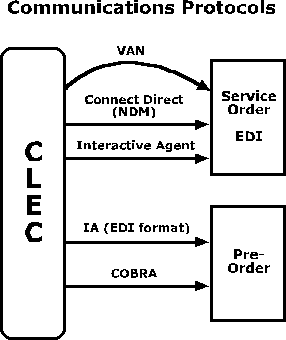
The Interactive Agent (IA) is an Industry Guideline Specification for the exchange of EDI transaction sets between AT&T and CLECs. The IA is available for local pre-ordering inquiries, and also one of the available connectivity options for EDI ordering.
AT&T follows the Telecommunications Industry Forum's TCIF/98-006 specification for the IA. Specifically, AT&T uses the Interactive Agent's Plain EDI Message to send EDI transaction sets. A Secure Site 128-bit digital certificate is also required. AT&T uses a certificate from Verisign, signed by RSA Data Security, Inc. For ordering AT&T requires the use of the 997 Acknowledgement and the IA Receipt Message to acknowledge receipt of each EDI transaction set. In the pre-order environment the use of 997 Acknowledgements is not supported. The use of the IA Receipt in the pre-order environment is not recommended, however can be negotiated on a CLEC by CLEC basis.
AT&T does not support the IA's resumable session option in Issue 2 of the specification. TCIF/98-006 Issue 3, or the most current Issue, is recommended. Standard port assignments (6998 for Pre-order and port 6999 for Order) are used.
There are performance considerations involved in the use of the IA for pre-order. The IA Issue 3 Specification uses the newer Transport Layer Security (TLS) to gain persistent sessions. Persistent sessions eliminate nearly all of the handshake exchanges used in Issue 2 as volumes increase. The use of up to three Trading Partner IDs can provide for multi-tasking to increase throughput. Finally, AT&T can negotiate extensions to the specification, on an individual basis, that expands the given limits on concurrent sessions. Recall that the alternative Industry Guideline of CORBA was architected for a real-time environment and is appropriate for instances where pre-order performance is the overriding design consideration.
The AT&T Account Manager will provide the CLEC with the necessary forms for
requesting access to send/receive EDI or CORBA transactions.
The EDI/CORBA Request Form is versioned, and the current version of the form must be used. A Document stating the current versions of this form, as well as other CLEC related forms is available on CLEC On-Line. CLECs can gain access to this file on the CLEC Online Website by going to https://clec.ATT.com/clec selecting CLEC Handbook. Choose any state and then select the OSS (Operational Support Systems) menu.
The CLEC initiates the process by sending an EDI/CORBA Request form through
their Account Manager to the IS Call Center. The Call Center confirms that the
CLEC has a circuit into one of AT&T’s xRAFs, and initiates the appropriate routing
and the firewall configuration changes to allow the requested IPs to connect
to the appropriate application via the preferred transmission method (Connect:Direct,
IA, CORBA,VAN). The connectivity setup takes approximately 10 business days
to complete.
Once the connectivity has been established, the IS Call Center will forward
the EDI/CORBA Request form to the EDI group, and the back-end system groups.
The EDI Translator and back-end systems will be configured. This process will
take approximately 5 business days to complete.
After configuration is complete, connectivity testing will take place between the CLEC and the EDI group. Listed below are the steps required to test connectivity for the various communication protocols.
Connectivity Testing for EDI/CORBA
The CLEC initiates the process by sending an EDI/CORBA Request form through
their Account Manager to the IS Call Center. The Call Center confirms that the
CLEC has a circuit into the appropriate xRAF, and initiates the appropriate
routing and the firewall configuration changes to allow the requested IPs to
connect to the appropriate application via the preferred transmission method
(Connect:Direct, IA, CORBA,VAN).
The IS Call Center will forward the EDI/CORBA Request form to the EDI group
after they receive verification that the routing and firewall configuration
has been completed.
The connectivity testing process requires hardware and software to be properly
configured before the test can be considered successful. Accordingly, timeframes
for connectivity testing will vary depending on the experience level, technical
expertise, and hardware/software readiness of the CLEC's resources. A planning
"rule of thumb" is 10 to 14 days; however, actual timeframes have ranged from
as short as two days to as long as six weeks.
For Interactive Agent (IA):
The EDI group sets up the CLEC in IA and the AT&T EDI translator.
To test basic connectivity between the CLEC's IA and AT&T's IA, the CLEC will telnet to the application IP and AT&T will telnet to the CLEC. The firewall is monitored at this time to make sure the CLEC is routing properly through the xRAF and going to the application. After this has been confirmed a test order/pre-order is sent from the CLEC and checked for flow through.
AT&T will verify the following:Connectivity testing continues until test order/pre-order successfully flows through the system and a response is received by the CLEC. When this has been accomplished, connectivity testing is complete, and testing is handed over to the OSS Support Manager.
- That the order/pre-order was received by AT&T.
- That it processed through the translator.
- That it went out from AT&T's IA and was received by the CLEC.
For CORBA:
To test basic connectivity between the CLEC's CORBA host and AT&T's CORBA host, the CLEC will telnet to the application IP. The firewall is monitored at this time to make sure the CLEC is routing properly through the xRAF and going to the application.
When this has been accomplished, basic connectivity testing is complete, and testing is handed over to the OSS Support Manager for additional testing upon completion of CLEC interface development or installation. This testing consists of the successful completion of a single transaction for the purpose of making sure CLEC and AT&T software has been properly set up, including but not limited to SSL, IORs, IDL, CLEC interfaces, and downstream AT&T OSS applications.
For Connect:Direct (also known as NDM):
The EDI group sets up the CLEC in Connect:Direct and the AT&T EDI translator.
To test basic connectivity between the CLEC and AT&T, the CLEC will send a file to AT&T. This can be a text file - does not have to be EDI format. The firewall is monitored to make sure the CLEC is routing properly through the xRAF and going to the application.
AT&T will verify the following:
- That the user ID and password are set up properly.
- That the order was received by AT&T and sufficient permissions were granted to create the appropriate file on the AT&T system.
- That the CLEC can receive a file sent from AT&T and it was placed in the appropriate directory for the CLEC.
After confirming that both the CLEC and AT&T can send and receive successfully, an EDI order is sent to check for basic formatting (i.e. if the file is wrapped, fixed block, 80 bytes). When this has been accomplished, connectivity testing is complete. Following completion of the afore mentioned steps, prior to using this protocol with AT&T, automation of the NDM services must take place. This step will complete approximately 4 business days after completion of connectivity steps. Once automation is in place testing is handed over to the OSS Support Manager.
For Value Added Network (VAN):
The EDI group sets up the CLEC in the AT&T EDI translator. The CLEC and AT&T exchange VAN account information. Each is responsible for setting up access on their VAN. If the CLEC is using the same VAN as AT&T, the account will be set up as 50/50 (each pays for transmissions they originate).
After confirming that both the CLEC and AT&T can send and receive successfully, an EDI order is sent to check for basic formatting (i.e. if the file is wrapped, fixed block, 80 bytes). When this has been accomplished, connectivity testing is complete, and testing is handed over to the OSS Support Manager.
Once connectivity testing has been completed, the CLEC will begin implementing
their test plan with the EDI Testing team.
If a CLEC is updating versions of the EDI or CORBA interfaces, the Versioning Checklist should be used to verify that all necessary steps are completed. If nothing more than the version is changing, the CLEC can submit the EDI/CORBA Version Change Form, rather than a new EDI/CORBA Request Form. All forms are available from your AT&T Account Manager or OSS Support Person, and they will work with you to determine which steps must be taken.
For more information please refer to the Versioning section of the CLEC On-Line Website at https://clec.att.com/clec/hb/shell.cfm?section=229&hb=778
Under certain circumstances, fields that are necessary to create syntactically correct EDI structures, as specified by ANSI X.12, will be marked as "optional", or "not used" by the business rule documentation. While these fields may not be necessary for the back-end systems to process a request, EDI does need them mapped, in order to meet syntax rules. This situation will occur on fields that are designated "optional" or "not used" by the business rules, and are mapped to the N1 segment in EDI. Without including the mapping for these fields in EDI, it would not be possible to begin the N1 Loop that is used to pass other fields on a request.
An example of this is the CCNA field. Although the field is not used by the back-end systems, it is necessary to begin the N1*78 loop which is also used to pass fields such as ACTL, INIT and TEL NO (INIT). To accommodate this, the element that would normally contain the field can be populated with the literal "NONE". EDI will not pass this value downstream, but it will allow for a syntactically correct EDI loop that can be used to pass other fields.
…
N1*78*NONE
NX2*90*ACTL
PER*AG*INIT*TE*TEL NO
…
The following fields have been identified as fields that start a N1 loop in EDI, but may not always be necessary from a business rule perspective:
CCNA and DSGCON on the LSR Form - CLEC may map the generic value of NONE or they may map the applicable value.
NAME on the End User Form - the CLEC may map the generic value of NONE or they may map the applicable NAME value in all regions except Pacific, when the SC is CA or NV.
NAME on the DL Form - CLEC may map the generic value of NONE or they may map the applicable NAME value.
Other fields such as ACNA, which is marked as "not used" by the business rules, but is used by EDI to begin a N1 Loop, would not need to be mapped on AT&T requests, since no other fields that occur in the same loop as ACNA are used by AT&T. On CSI Responses with Listing Information, the LTN field is mapped to a PO1/SI segment. Per Industry Guidelines, this field is also mapped to the PO1/N104 in order to start the N1~DH loop. If the LTN is not available AT&T will return N1~DH~NONE in order to begin the N1 loop. This would also apply for the N1~IT loop when a name is not available to begin the loop.